Roomprint

SCAN · PLAN · COLOUR

The floor plan app that scans your home with your iPhone

Walk round each room with your iPhone or iPad Pro and Roomprint draws the floor plan for you, with every wall measured. See your home in 3D, try paint colours and new floors, then print the plan to scale.

  • Pay once, no subscription
  • No account or login
  • Plans stay on your iPhone

Features

Measure, plan and decorate from one app

No tape measure, no graph paper, no guessing whether the sofa will fit. Roomprint uses the LiDAR scanner in your iPhone or iPad Pro to measure as you walk.

Scan

A room takes about a minute. Walk round slowly and point at the walls.

  • Walls, doors and windows found and measured for you
  • Scan room after room and they line up on one plan
  • Add more floors for houses with stairs
  • Pick the room type, or add your own, like Study or Classroom
  • Sofas, beds, tables and appliances picked up as you go

Plan

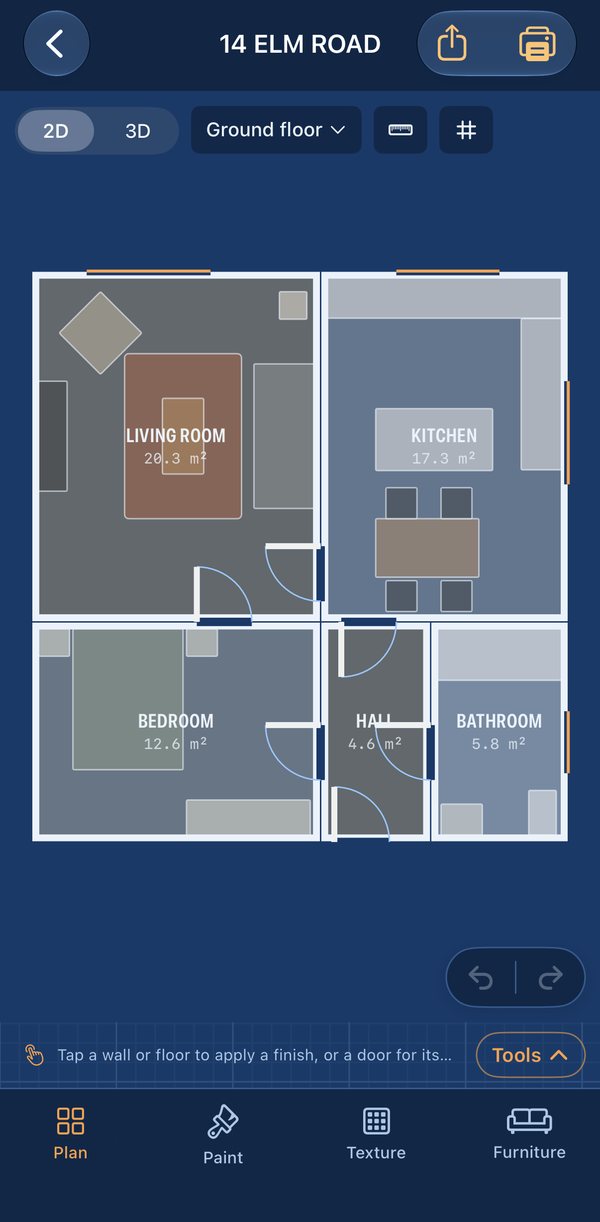
A clean blueprint of your home, with every room named and measured.

  • Wall lengths and room areas, in metres or feet and inches
  • Switch between 2D and a 3D model you can spin round
  • A north arrow, worked out from your phone’s compass
  • Move, turn and resize furniture. Walls stop it going through
  • Undo and redo every change

Decorate

Try ideas on the plan before you buy a tin of paint or a roll of carpet.

  • Paint walls and ceilings from a palette or any hex colour
  • Point your camera at something to match its colour
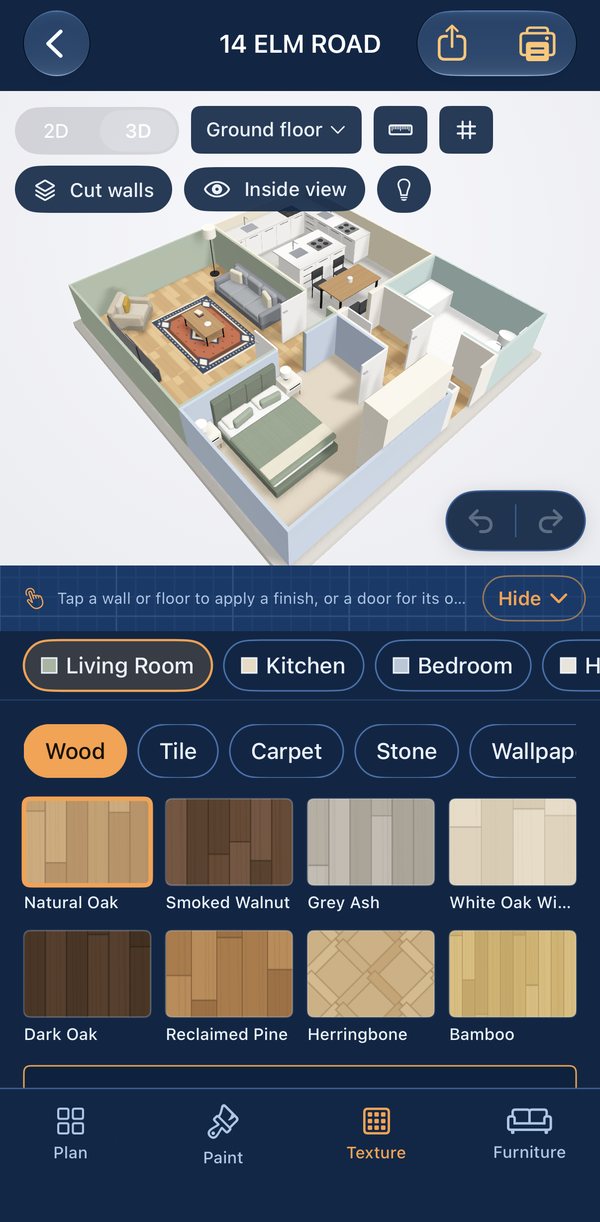
  • Wood, tile, carpet, stone and wallpaper at real size
  • Home and office furniture, modern or traditional, in any colour
  • See how much paint and flooring to buy

How it works

From the front door to a printed floor plan in five steps

Everything saves as you go, so you can scan a few rooms today and decorate later.

  1. Name your plan

    “Our flat”, “14 Elm Road”, whatever helps you find it again.

  2. Scan a room

    Walk slowly round the edge with your iPhone pointing at the walls. Tap Finish room when it looks right.

  3. Name it, then the next

    Pick Kitchen, Bedroom and so on, choose the floor, and carry on into the next room.

  4. Make it yours

    Paint walls, change the flooring and move the furniture around in 2D or 3D. If the scan got a wall wrong, drag it into place.

  5. Print or share

    Print it to scale, save a PDF, or send a CAD file to your builder.

3D view

See your whole home as a 3D model

Cut-away or full-height walls

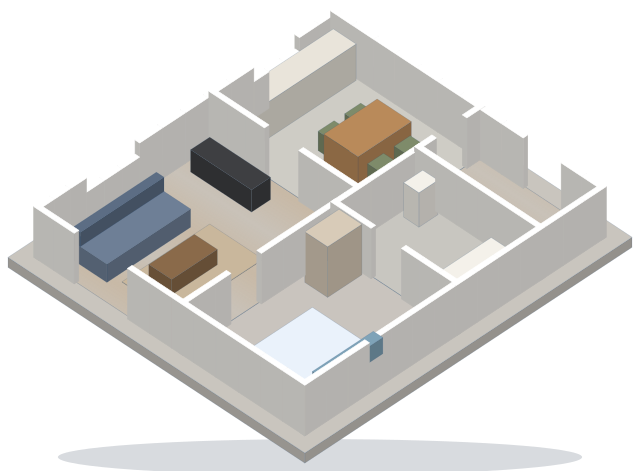
The cut-away view lets you see into every room at once, like a doll’s house. Switch to full-height walls to get a feel for the space.

Stand inside a room

Inside view puts you in the middle of the room at eye level, so you can look round and paint the ceiling.

Tap to paint

Pick a colour or a floor, then tap a wall or floor in the model. It changes straight away.

Furniture that behaves

Drag a sofa into place and it slides along the wall instead of going through it, and still fits through doorways. Put a laptop or lamp on a desk and it sits on top.

Doors like yours

Tap a door to change its colour, which side it’s hung on, which way it opens, and whether it’s open or shut.

Lights on

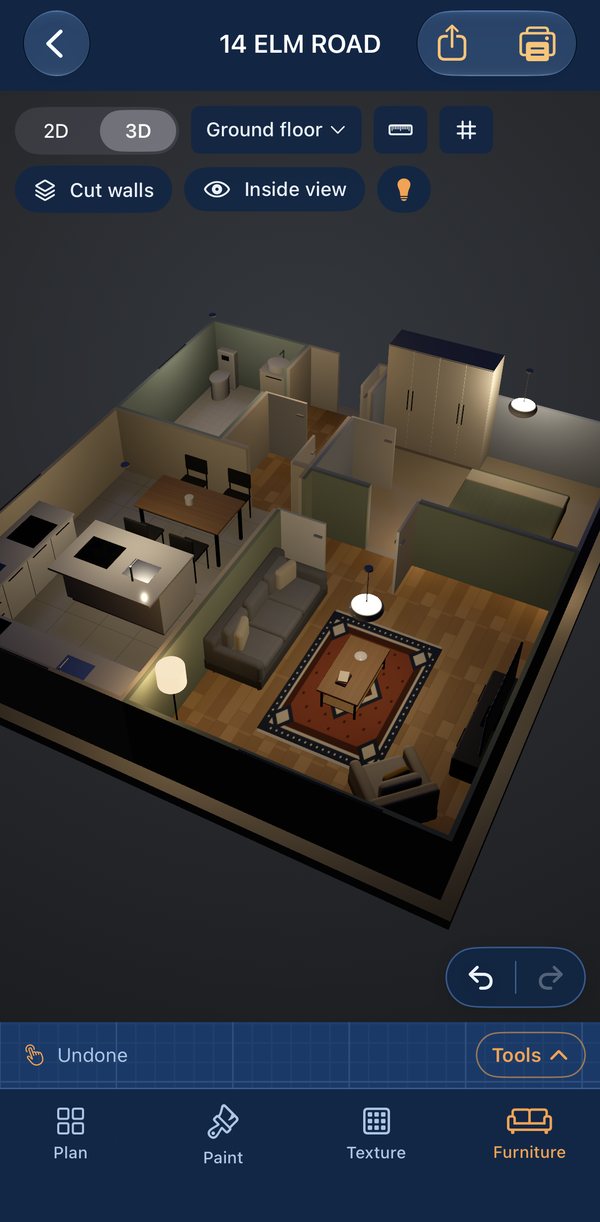
Switch to the evening view and the lamps come on, with the night outside the windows. Add downlights or a pendant and they light up the room too.

A two-bedroom flat in Roomprint’s cut-away 3D view, with oak floors in the living room, tiles in the kitchen and bathroom, carpet in the bedroom, and furniture in every room

Measure and check

Get the numbers right before you spend anything

No scan is perfect, so you can put right anything the scanner missed, check whether things will fit, and keep notes as you go.

Fix the plan

If a wall comes out in the wrong place, drag it to where it should be.

  • Move walls and corners, or type a wall’s exact length
  • Split a wall to add an alcove, chimney breast or bay
  • Add or remove doors and windows
  • Undo anything with one tap

Measure

Tap two points on the plan and Roomprint gives you the distance.

  • Points snap to corners and walls
  • Length × width for every room
  • The gap from a sofa or bed to each wall
  • A grid of 1 m or 1 ft squares, lined up with each room

Notes and photos

Pin a note to any spot on the plan, with a photo if you like.

  • Snagging lists, damp patches, jobs for the builder
  • Numbered pins in 2D and 3D
  • Printed in your PDF, photos and all
  • Handy when you’re moving house or getting quotes

Colours and floors

Try paint colours and flooring before you buy

Textures are drawn at their real size, so a herringbone floor or a striped wallpaper looks the right scale in your room.

Paint

Fifteen colours to start with, any hex code you like, or point your camera at a cushion or a paint chart to match it.

  • Chalk White
  • Linen
  • Warm Stone
  • Sand Dune
  • Mushroom
  • Sage Mist
  • Olive Grove
  • Forest
  • Duck Egg
  • Coastal Blue
  • Ink Navy
  • Blush
  • Terracotta
  • Ochre
  • Charcoal

Floors and wallpaper

From natural oak and Carrara marble to sisal weave and a regency stripe.

  • Natural Oak
  • Herringbone
  • Smoked Walnut
  • Carrara Marble
  • Checkerboard
  • Sage Zellige
  • Terracotta Quarry
  • Sisal Weave
  • Navy Berber
  • Regency Stripe
8 woods8 tiles8 carpets4 stones4 wallpapers

How much to buy

Once you’ve chosen, Roomprint works out the shopping list. Wall areas leave out the doors and windows, and you can set the number of coats and how much extra flooring to allow for cuts.

Paint in litres and tinsFlooring in packs and boxesCarpet off the rollWallpaper rolls

Print and export

Floor plans for estate agents, architects and builders

Drawings come out to a standard scale with a title block, so you can measure off the paper. CAD and 3D files open in the software the professionals already use.

PDF

Drawing sheets

What you get
One page per floor at 1:50, 1:100 or 1/4″ = 1′, on A4, A3, Letter or Tabloid, with room sizes in metres and feet, the total floor area, and your notes and photos if you want them
Good for
Sales and letting particulars, quotes, planning ideas
PRINT

AirPrint

What you get
The same sheets sent straight to your printer, true to scale
Good for
Sketching ideas on paper with a pencil and ruler
PNG

Pictures

What you get
The 2D plan or a 3D picture of your home
Good for
Messages, listings and social posts
DXF

CAD drawing

What you get
Walls, doors, windows, furniture and room names on separate layers, in metres
Opens in
AutoCAD, DraftSight, LibreCAD, SketchUp Pro and most CAD apps
IFC

BIM model

What you get
Storeys, rooms, walls, doors, windows and furniture
Opens in
Revit, Archicad, Vectorworks and free IFC viewers
USDZ

3D model

What you get
Apple’s 3D model of your scan
Good for
Viewing in AR on an iPhone, iPad or Mac, or in 3D apps

Every export can carry a small “Created with Roomprint” mark in the corner. You can turn it off in Settings.

Pricing

Pay once. No subscription.

Scan and plan for free, for as long as you like. When you want to print or send your plan, it’s one payment, yours to keep on every iPhone and iPad signed in to your Apple Account.

Free

Scan and plan

£0
  • Scan as many rooms and floors as you like
  • 2D plan with measurements, and 3D view
  • Paint, flooring and furniture
  • Measuring, notes and the paint and flooring calculator
One-off

Roomprint unlock

£9.99once
  • Print to scale and save PDF drawing sheets
  • PNG, DXF, IFC and USDZ exports
  • Share your plan, without the preview mark
  • Share room areas as a spreadsheet, and your paint and flooring list
Any iPhone or iPad

Viewer mode

£0
  • Open plans scanned on another device through iCloud Drive
  • Decorate and move furniture
  • Print and export with the unlock

Devices

Which iPhones and iPads can scan?

Scanning needs the LiDAR scanner, the small black dot next to the cameras on Pro models.

Scan, plan and decorate

  • iPhone 12 Pro and iPhone 12 Pro Max, and every Pro and Pro Max model since
  • iPad Pro 11-inch (2nd generation) and iPad Pro 12.9-inch (4th generation), and every iPad Pro since

iOS 18 or iPadOS 18 or later.

View and decorate

Any iPhone or iPad with iOS 18 or iPadOS 18. Turn on iCloud Drive and plans you scanned on a Pro model appear here too, ready to decorate, print and share.

FAQ

Questions about scanning and floor plans

Scanning

Which iPhones and iPads can scan a room?

Scanning needs the LiDAR scanner, which is on the iPhone 12 Pro, iPhone 12 Pro Max and every Pro and Pro Max model since, and on iPad Pro from 2020 onwards.

On any other iPhone or iPad, Roomprint opens in Viewer mode. You can open, decorate, print and share plans scanned on a Pro model through iCloud Drive.

How accurate are the measurements?

In a typical room LiDAR is usually within a few centimetres, which is plenty for planning furniture, ordering carpet or getting quotes.

Mirrors, big windows, very dark walls and a lot of clutter can throw it off. If you’re ordering something made to measure, like a fitted kitchen or wardrobe, check the key measurements with a tape first.

If the scan gets a wall wrong, you can drag it into place or type its exact length.

How long does it take to scan a room?

About a minute for a bedroom or living room. Walk slowly round the edge of the room, pointing your iPhone at the walls, corners, doors and windows. Good light helps.

Can I scan a whole house?

Yes. Scan a room, name it, then walk into the next one and keep going. Rooms you scan one after another line up on the same plan. For a house with stairs, add a floor and scan the rooms upstairs onto it.

Does it find my furniture?

Yes. Sofas, chairs, tables, beds, storage, TVs, baths, toilets, sinks and kitchen appliances are picked up during the scan and turned into furniture you can move, turn, resize and recolour. If you’d rather start with empty rooms, turn off Detect Furniture in Settings.

Plans and exports

Can I send my floor plan to an architect or builder?

Yes. The PDF is drawn to a standard scale with a title block. For CAD there’s a DXF file, which opens in AutoCAD and most drawing apps, and an IFC file for BIM software such as Revit and Archicad.

Is the printed plan to scale?

Yes. Roomprint picks the largest standard scale that fits, such as 1:50 or 1:100 (or 1/4″ = 1′ in feet and inches), on A4, A3, Letter or Tabloid. Print at 100% (sometimes called actual size) and you can measure off the paper with a scale ruler.

Can I use feet and inches?

Yes. Choose Imperial in Settings and every measurement, on screen and on exports, is shown in feet and inches.

Can I use Roomprint for a property listing?

Yes. Turn on Room Sizes & Area Schedule when you export, and the drawing shows each room’s size in metres and feet, the total floor area in m² and sq ft, and a short “for illustration only” note, the way most sales and letting particulars show plans.

If an agent wants a particular format, the DXF can be restyled in CAD.

Can I turn the measurements off?

Yes. Tap the ruler button above the plan to show or hide wall lengths and room sizes, in 2D and in 3D. Exported drawings always include them. The grid button next to it shows 1 m or 1 ft squares.

Can I change a wall the scan got wrong?

Yes. In the Plan panel tap Edit Walls, then tap the wall. Drag it to move it, drag the handles at its ends to move a corner, or type its exact length.

You can split a wall to make an alcove or bay, add or remove doors and windows, and undo any change.

Can it tell me how much paint or flooring to buy?

Yes. Paint the walls and lay the floors in the app, then open Areas, Paint & Flooring. It works out the litres and tins of each colour, leaving out doors and windows, and the packs, boxes or rolls of flooring and wallpaper, with extra for cuts.

It’s an estimate, so check the sizes in the shop before you buy.

Can I add notes and photos to a plan?

Yes. Tap Add Note, then tap the plan where it should go, and add a few words and a photo. Notes show as numbered pins, and can be printed in your PDF with their photos.

Buying and privacy

How much does Roomprint cost?

Roomprint is free to download. Scanning, the 2D and 3D plan, measurements, paint, flooring and furniture are all free. To print, export and share your plans there’s one payment of £9.99, with no subscription. It also removes the faint preview mark.

Do I need an account?

No. There’s no Roomprint account and no sign-in. If you buy the unlock, Apple remembers it against your Apple Account, so you can restore it on your other iPhones and iPads.

Where are my plans stored?

On your iPhone or iPad, and in your own iCloud Drive if you turn on sync. There’s no Roomprint server, so we never see your plans or scans.

Why does Roomprint ask for my location?

It’s optional. With it, Roomprint uses the compass to work out which way is north on your plan, and adds the street address to printed drawings. Your location isn’t sent to us.

Is there an Android version?

No. Roomprint is built on Apple’s LiDAR room scanning, so it’s for iPhone and iPad only.

Updates

Hear about new features

We’ll email you when we add something new to Roomprint, with tips for getting the most out of your scans. A few emails a year, never spam.

Got an iPhone Pro or iPad Pro? Download Roomprint and scan your first room in about a minute.